> ## Documentation Index
> Fetch the complete documentation index at: https://partner-integrations.voyado.com/llms.txt
> Use this file to discover all available pages before exploring further.
# Configuration
Follow these steps to integrate your Engage account with your BigCommerce store using the Voyado Engage connector for BigCommerce.
## Setting up the connector
Log into BigCommerce admin and access your BigCommerce admin panel.
* Navigate to **Settings > Store-level API accounts**
* Create an API account and choose the following:
* Token type: V2/V3 Token
* Name: Voyado Engage connector
* Choose the following OAuth scopes:
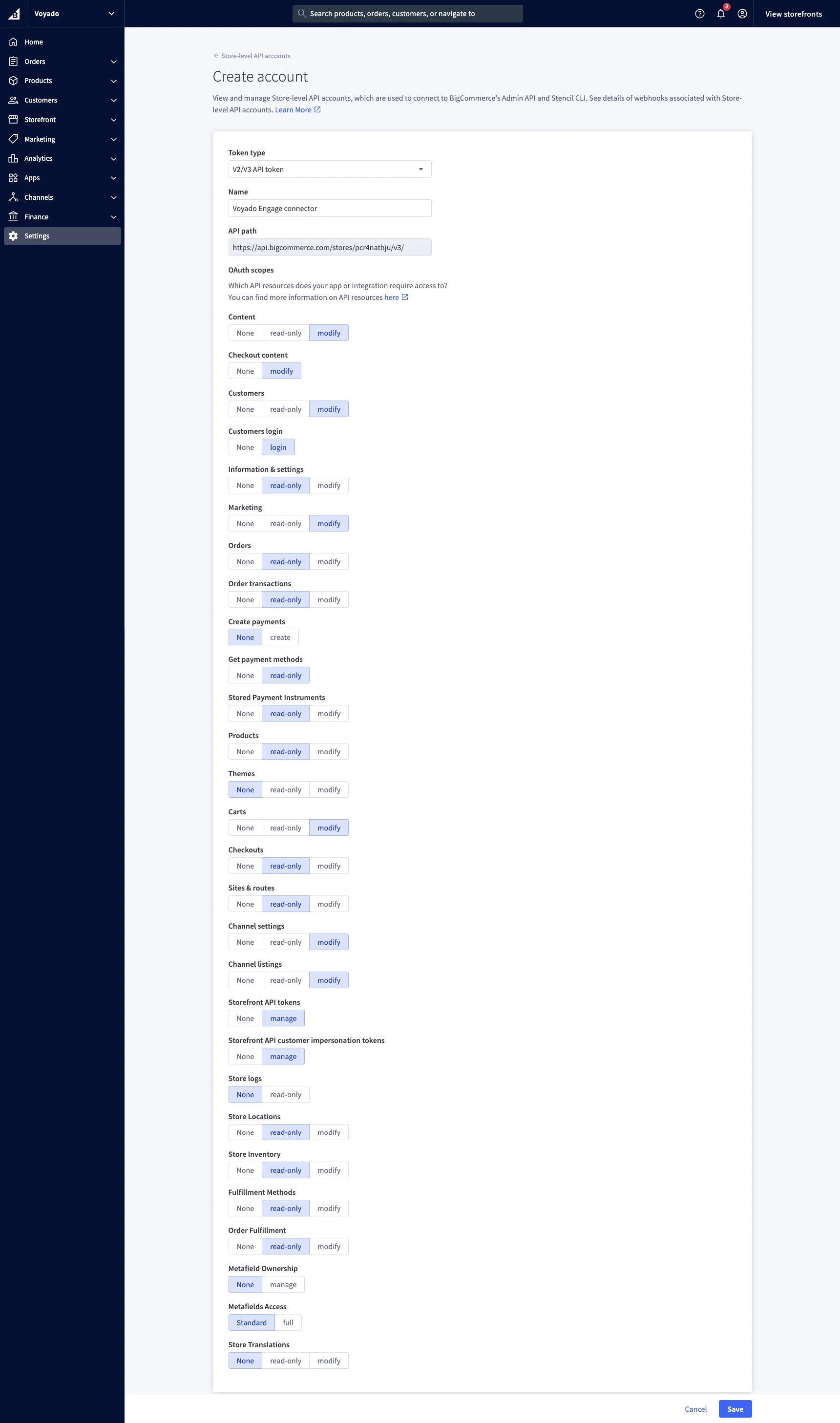 * Click **Save**
* Download the file and/or copy the credentials (Client ID, Client Secret, Access token) and store them securely.
* Click **Done**
* Share the credentials in a secure way with your Voyado team together with the **Store hash** of your BigCommerce store.
The **Store Hash** can be found in your BigCommerce admin URL:
`https://store-{storeHash}.mybigcommerce.com/manage/dashboard`
BigCommerce does not validate phone numbers in the same way as Voyado Engage. To ensure compatibility, you must add validation to all phone number fields in customer registration forms. We recommend using the [Google libphonenumber library](https://github.com/google/libphonenumber?tab=readme-ov-file) for accurate validation.
* Click **Save**
* Download the file and/or copy the credentials (Client ID, Client Secret, Access token) and store them securely.
* Click **Done**
* Share the credentials in a secure way with your Voyado team together with the **Store hash** of your BigCommerce store.
The **Store Hash** can be found in your BigCommerce admin URL:
`https://store-{storeHash}.mybigcommerce.com/manage/dashboard`
BigCommerce does not validate phone numbers in the same way as Voyado Engage. To ensure compatibility, you must add validation to all phone number fields in customer registration forms. We recommend using the [Google libphonenumber library](https://github.com/google/libphonenumber?tab=readme-ov-file) for accurate validation.