> ## Documentation Index
> Fetch the complete documentation index at: https://partner-integrations.voyado.com/llms.txt
> Use this file to discover all available pages before exploring further.
# Back in stock headless
For Engage to trigger a back-in-stock email, all products (including out of stock products) must be present in the product feed that is connected to Engage. If a product is *not* in the feed, a BIS email cannot be sent for it.
When running Shopify as *headless*, back-in-stock functionality is achieved using this endpoint:
```http theme={null}
POST https://live.voyado.eastsideapps.io/api/back-in-stock/subscribe
```
The payload sent to this endpoint to define a subscription for a particular item looks like this:
```json theme={null}
{
"shop": "store-uk.myshopify.com",
"locale": "en",
"country": "GB",
"preSelectStatus": false,
"email": "john@example.com",
"acceptsEmail": true,
"acceptsSms": false,
"hasPhone": false,
"phone": "+4671234567",
"variant": {
"id": "47695659598128",
"is_available": false,
"sku": "jersey-XS-red"
},
"product": {
"id": "8386707489072"
}
}
```
The output to Engage will then look like this for the contact creation request:
```json theme={null}
{
"language": "en",
"countryCode": "GB",
"email": "john@example.com",
"acceptsEmail": true,
"acceptsSms": false,
"mobilePhone": "+4671234567",
}
```
And like this for the create subscription request:
```json theme={null}
{
"contactId": "f5774867-1234-445f-85a4-af1200eced95",
"locale": "en-GB",
"sku": "jersey-XS-red",
"externalId": "store-uk.myshopify.com"
}
```
The fields used are:
The shop's unique identifier on Shopify. Example: "store-uk.myshopify.com".
The locale setting of the merchant. Example: "en".
The country code of the user's location. Example: "GB".
If marketing opt-in is preselected. Example: false
The email address of the user. Example: [john@example.com](mailto:john@example.com).
Indicates whether the user accepts email communication. Example: true.
Indicates whether the user accepts SMS communication. Example: false.
Indicates whether the user has provided a phone number. Example: false.
The variant's unique identifier. Example: "47695659598128".
The stock-keeping-unit associated with the variant. Example: "jersey-XS-red".
Indicates whether the variant is available for purchase. Example: false.
The product's unique identifier. Example: "8386707489072".
### More about preSelectStatus
The preSelectStatus field indicates whether the marketing opt-in checkbox is pre-selected on the back-in-stock subscription form. This boolean value is set by the merchant and determines the initial state of the marketing opt-in option for users interacting with the widget.
**true:** The marketing opt-in checkbox is now pre-selected, meaning customers will be opted into marketing communications by default unless they choose to opt out.
**false:** In this case the marketing opt-in checkbox is not pre-selected, meaning customers will need to actively opt into marketing communications.
The preSelectStatus is used to determine if an update to a customer's preferences is necessary. It ensures that any updates do not override consent previously given by the customer.
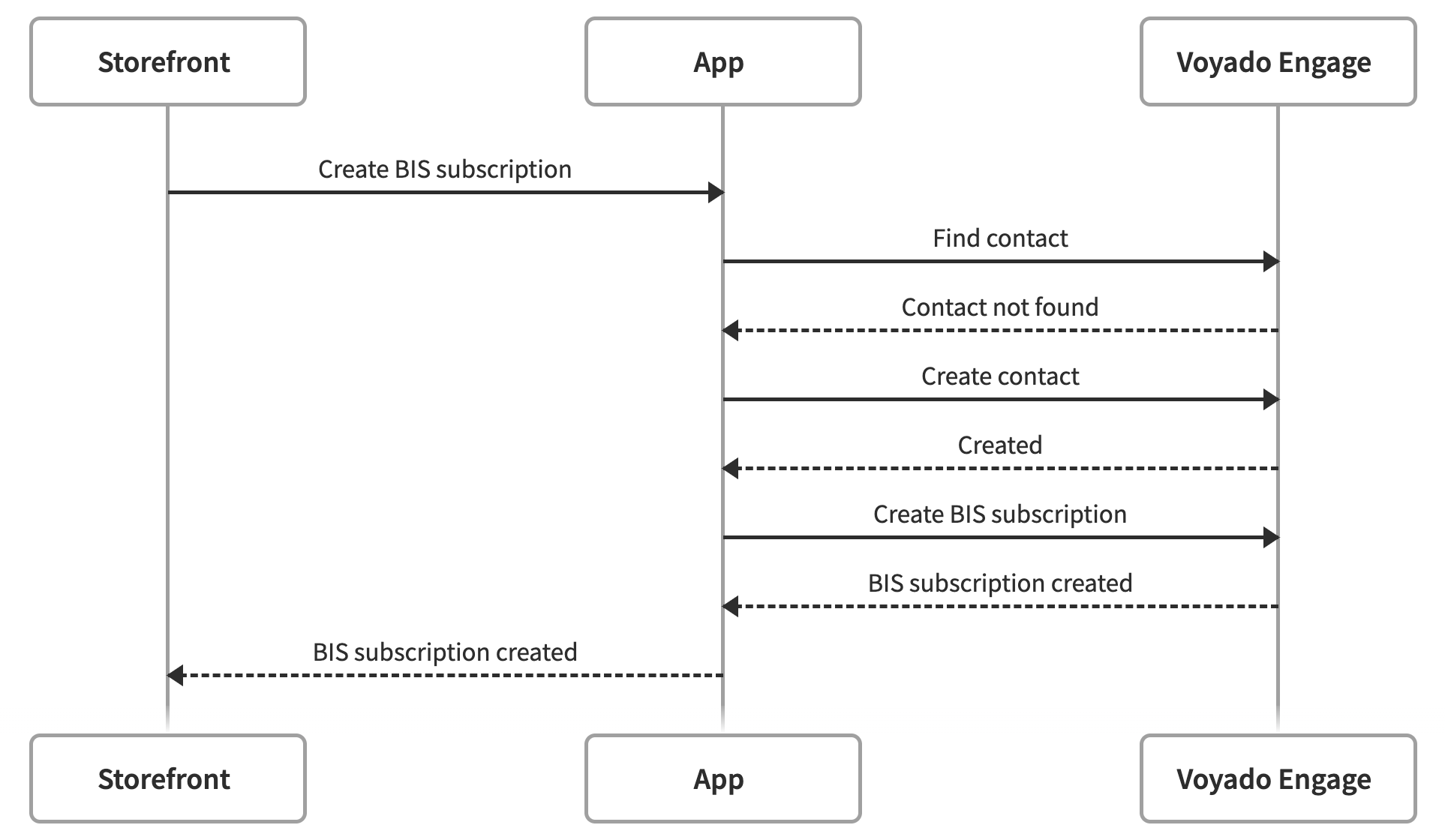
## Data flow
Here is the data flow when working with back-in-stock subscriptions: