> ## Documentation Index
> Fetch the complete documentation index at: https://partner-integrations.voyado.com/llms.txt
> Use this file to discover all available pages before exploring further.
# Sitoo
## Introduction
Sitoo is a cloud-native mobile point of sale (mPOS) and omnichannel platform for global retailers, empowering retailers to sell everywhere and fulfil anywhere.
 An open REST API enables Sitoo's real-time data to be shared across all retail systems. The cloud-native mPOS platform is scalable, built for high transaction volumes, and also has an offline mode. It's used by retailers in Europe, EMEA, Asia-Pacific and across North America.
Sitoo has a native integration with Voyado Engage, enabling you to:
* Register your customers in Sitoo and sync them to Engage in real-time
* Identify customers directly in Sitoo, regardless if they were registered in store or online.
* Sync purchases and returns from Sitoo to Engage
* Assign personal discounts based on segments in Engage connected to campaigns in Sitoo.
* Reward customers with vouchers generated in Engage and enable them in Sitoo.
* Enable self check-out and let customers identify themselves and redeem their offers and vouchers.
* Build offline campaigns with labels assigned through the marketing automation platform in Engage.
Here's how to use the Engage integration with Sitoo.
## Requirements
* An active Engage CXP and Omni license
* An active Sitoo license
## Configuration in Engage
Here is what your Engage team needs to do:
* In the client's tenant, create an API-key user for the Sitoo integration.
* Send the API key and the tenant's base URL for API access to Sitoo.
* If the client has stores in the US, enable the feature toggle “SkipReceiptTotalGrossPriceValidation“ since the US uses a sales tax applied to the totalGrossPrice and not to each line item.
* If the store is not in a country using the defined group currency, then the currency needs to be retrieved using an exchange rate. This needs to be set up in Engage using a fixed exchange rate.
## Configuration in Sitoo
The API docs for Sitoo can be found here:
An Engage integration is configured in Sitoo using [YAML](https://en.wikipedia.org/wiki/YAML). Using this, you can choose which attributes to use for searching and which to use for for creating, editing and displaying in the POS.
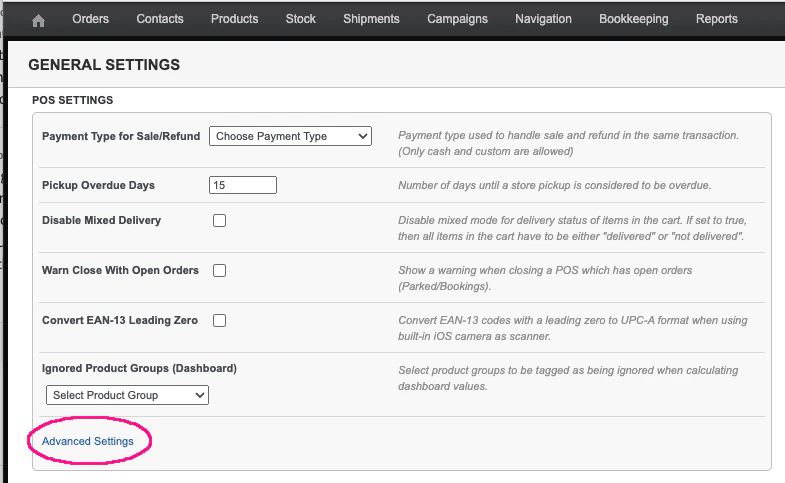
The YAML-configuration is located in Sitoo under **Settings / General / POS Settings / Advanced Settings**.
This will open up the window where you enter your YAML, which will look something like this:
An open REST API enables Sitoo's real-time data to be shared across all retail systems. The cloud-native mPOS platform is scalable, built for high transaction volumes, and also has an offline mode. It's used by retailers in Europe, EMEA, Asia-Pacific and across North America.
Sitoo has a native integration with Voyado Engage, enabling you to:
* Register your customers in Sitoo and sync them to Engage in real-time
* Identify customers directly in Sitoo, regardless if they were registered in store or online.
* Sync purchases and returns from Sitoo to Engage
* Assign personal discounts based on segments in Engage connected to campaigns in Sitoo.
* Reward customers with vouchers generated in Engage and enable them in Sitoo.
* Enable self check-out and let customers identify themselves and redeem their offers and vouchers.
* Build offline campaigns with labels assigned through the marketing automation platform in Engage.
Here's how to use the Engage integration with Sitoo.
## Requirements
* An active Engage CXP and Omni license
* An active Sitoo license
## Configuration in Engage
Here is what your Engage team needs to do:
* In the client's tenant, create an API-key user for the Sitoo integration.
* Send the API key and the tenant's base URL for API access to Sitoo.
* If the client has stores in the US, enable the feature toggle “SkipReceiptTotalGrossPriceValidation“ since the US uses a sales tax applied to the totalGrossPrice and not to each line item.
* If the store is not in a country using the defined group currency, then the currency needs to be retrieved using an exchange rate. This needs to be set up in Engage using a fixed exchange rate.
## Configuration in Sitoo
The API docs for Sitoo can be found here:
An Engage integration is configured in Sitoo using [YAML](https://en.wikipedia.org/wiki/YAML). Using this, you can choose which attributes to use for searching and which to use for for creating, editing and displaying in the POS.
The YAML-configuration is located in Sitoo under **Settings / General / POS Settings / Advanced Settings**.
This will open up the window where you enter your YAML, which will look something like this:
 Here's how to configure each section in the YAML.
### Connection and country settings
Under `handler` in the YAML is where you set base URL, API key and the country settings:
```yaml theme={null}
...
handler:
voyado:
api_url: 'https://example.voyado.com/api/'
api_key: 2b5f1234-12c4-4e20-a3d0-0749a51862aa
locale: en-GB
currency_code: EUR
...
```
### Attributes used to search for contacts
Under `search_types` and `client_settings` you'll define the attributes used to search for a contact in Engage:
```yaml theme={null}
...
client_settings:
search_types:
- mobile
- email
- personal_id
- member_number
...
```
### Contact lookup (Dun & Bradstreet)
Here you can configure the personal attribute used to enrich your contact's profiles through a vendor like Dun & Bradstreet. Under "client\_settings" you can define `lookup_type` as either "personal\_id" (for their personal identity number) or "mobile" (for their mobile number):
```yaml theme={null}
...
client_settings:
lookup_type: personal_id
...
```
### Attributes for creating contacts
In the `client_settings` section under `fields_add` is where you add the fields from Engage that will be accessible in Sitoo when adding a contact. These can either be "editable" or "readonly".
```yaml theme={null}
...
fields_add:
email: editable
name: editable
personal_id: editable
mobile: editable
invoice_address: editable
accepts_email: editable
accepts_sms: editable
accepts_mail: editable
consents: editable
...
```
If `consents` is set to "editable" then all consents will be visible in the POS when adding a contact.
### Attributes for editing contacts
These are the attributes available in the POS when updating an already existing contact. These are added to the `client_settings` section under `fields_edit`. The attributes that you want to be editable are listed as "editable". If they are not to be editable, make them "readonly".
```yaml theme={null}
...
fields_edit:
email: editable
name: editable
personal_id: editable
mobile: editable
invoice_address: editable
accepts_email: editable
accepts_sms: readonly
accepts_mail: readonly
consents: readonly
...
```
### Custom attributes
Under `sections` you can choose which custom attributes to display in the POS. You can add different subject lines and then the attributes connected to that subject line.
Attributes of type "array" cannot be displayed in the POS.
Here, `attribute` is the field name in Engage and `title` is the text displayed in POS.
```yaml theme={null}
...
sections:
-
title: 'Customer info'
fields:
-
title: 'Regular store'
attribute: currentStore.name
-
title: 'Customer number'
attribute: memberNumber
-
title: 'Reward points'
attribute: bonusPoints
-
title: Tier-level
attribute: bonusBasedLevel
-
title: 'Points left for upgrade'
attribute: bonusBasedLevelLeftForUpgrade
-
title: Age
attribute: age
-
title: ZIP
attribute: zipCode
display_true: JA
-
title: 'Personal ID'
attribute: socialSecurityNumber
-
title: C/O
attribute: careOf
display_false: Ingen
-
title: 'Finns ej'
attribute: nullAttr
-
title: 'Secrecy marked'
attribute: secrecyMarked
display_false: 'Sekretess åberopad'
...
```
The `display_false` and `display_true` values contain the texts displayed if the field has data (display\_true) or if it doesn't (display\_false).
Engage standard attributes are always editable in Sitoo, and the fields listed as editable in `fields_edit` are in addition to these. Engage custom attributes (meaning those that are *not* standard attributes) can be viewed in Sitoo but not edited.
### Default discounts and vouchers
These are general member discounts which are applied in Sitoo when a contact is identified. The discounts and vouchers are created in Sitoo and do not have to be connected to a promotion in Engage.
```yaml theme={null}
...
voucher_passwords_default:
- pricelist_member_2021
- spring_member
...
```
### Discounts and vouchers connected to labels
These are discounts automatically applied when a contact with a certain label is identified. The voucher is created in Sitoo and in the configuration you can define which discount or voucher is triggered by which label.
```yaml theme={null}
...
voucher_passwords_from_labels:
-
label_name: Staff
voucher_passwords:
- staffdiscount
...
```
### Returning item purchased with voucher
If such an item is returned, the voucher used to buy it will not be automatically reactivated. This needs to be manually done in Engage.
## Engage API endpoints
Sitoo needs to access several Engage API endpoints to allow this integration to work.
### Retrieving a contact
```http Get contact's full data theme={null}
GET v2/contactoverview
```
```http Get all labels for contact theme={null}
GET v1/contacts/contactId/labels
```
The endpoint used to get a contact's labels uses V1 of the API.
### Creating / updating a contact
```http Creating a contact theme={null}
POST v2/contacts
```
```http Updating a specific contact theme={null}
POST v2/contacts/contactId
```
### Fetching consents
```http See all consents in Engage theme={null}
GET v2/consents
```
```http See consents which are true for specific contact theme={null}
GET v2/contactoverview
```
### Fetching from Dun & Bradstreet
```http Get contact's enhanced data using personal identity number or mobile phone number theme={null}
GET v2/personlookup/getpersonlookup
```
You'll see an example of the response on your Swagger page.
### Fetching transactions for a contact
```http Get transactions for a contact (results are paged) theme={null}
GET v2/contacts/contactId/transactions
```
### Creating a transaction
```http Add transaction using contactId as match key theme={null}
POST v2/receipts
```
### Redeeming a promotion
```http Redeeming a promotion theme={null}
POST v2/contacts/contactId/posoffers/promotionId/redeem
```
### Redeeming a reward voucher
```http Redeeming reward voucher theme={null}
POST /api/v2/contacts/contactId/bonuschecks/rewardVoucherId/redeem
```
Bonus check is an older name for reward voucher in Engage.
Here's how to configure each section in the YAML.
### Connection and country settings
Under `handler` in the YAML is where you set base URL, API key and the country settings:
```yaml theme={null}
...
handler:
voyado:
api_url: 'https://example.voyado.com/api/'
api_key: 2b5f1234-12c4-4e20-a3d0-0749a51862aa
locale: en-GB
currency_code: EUR
...
```
### Attributes used to search for contacts
Under `search_types` and `client_settings` you'll define the attributes used to search for a contact in Engage:
```yaml theme={null}
...
client_settings:
search_types:
- mobile
- email
- personal_id
- member_number
...
```
### Contact lookup (Dun & Bradstreet)
Here you can configure the personal attribute used to enrich your contact's profiles through a vendor like Dun & Bradstreet. Under "client\_settings" you can define `lookup_type` as either "personal\_id" (for their personal identity number) or "mobile" (for their mobile number):
```yaml theme={null}
...
client_settings:
lookup_type: personal_id
...
```
### Attributes for creating contacts
In the `client_settings` section under `fields_add` is where you add the fields from Engage that will be accessible in Sitoo when adding a contact. These can either be "editable" or "readonly".
```yaml theme={null}
...
fields_add:
email: editable
name: editable
personal_id: editable
mobile: editable
invoice_address: editable
accepts_email: editable
accepts_sms: editable
accepts_mail: editable
consents: editable
...
```
If `consents` is set to "editable" then all consents will be visible in the POS when adding a contact.
### Attributes for editing contacts
These are the attributes available in the POS when updating an already existing contact. These are added to the `client_settings` section under `fields_edit`. The attributes that you want to be editable are listed as "editable". If they are not to be editable, make them "readonly".
```yaml theme={null}
...
fields_edit:
email: editable
name: editable
personal_id: editable
mobile: editable
invoice_address: editable
accepts_email: editable
accepts_sms: readonly
accepts_mail: readonly
consents: readonly
...
```
### Custom attributes
Under `sections` you can choose which custom attributes to display in the POS. You can add different subject lines and then the attributes connected to that subject line.
Attributes of type "array" cannot be displayed in the POS.
Here, `attribute` is the field name in Engage and `title` is the text displayed in POS.
```yaml theme={null}
...
sections:
-
title: 'Customer info'
fields:
-
title: 'Regular store'
attribute: currentStore.name
-
title: 'Customer number'
attribute: memberNumber
-
title: 'Reward points'
attribute: bonusPoints
-
title: Tier-level
attribute: bonusBasedLevel
-
title: 'Points left for upgrade'
attribute: bonusBasedLevelLeftForUpgrade
-
title: Age
attribute: age
-
title: ZIP
attribute: zipCode
display_true: JA
-
title: 'Personal ID'
attribute: socialSecurityNumber
-
title: C/O
attribute: careOf
display_false: Ingen
-
title: 'Finns ej'
attribute: nullAttr
-
title: 'Secrecy marked'
attribute: secrecyMarked
display_false: 'Sekretess åberopad'
...
```
The `display_false` and `display_true` values contain the texts displayed if the field has data (display\_true) or if it doesn't (display\_false).
Engage standard attributes are always editable in Sitoo, and the fields listed as editable in `fields_edit` are in addition to these. Engage custom attributes (meaning those that are *not* standard attributes) can be viewed in Sitoo but not edited.
### Default discounts and vouchers
These are general member discounts which are applied in Sitoo when a contact is identified. The discounts and vouchers are created in Sitoo and do not have to be connected to a promotion in Engage.
```yaml theme={null}
...
voucher_passwords_default:
- pricelist_member_2021
- spring_member
...
```
### Discounts and vouchers connected to labels
These are discounts automatically applied when a contact with a certain label is identified. The voucher is created in Sitoo and in the configuration you can define which discount or voucher is triggered by which label.
```yaml theme={null}
...
voucher_passwords_from_labels:
-
label_name: Staff
voucher_passwords:
- staffdiscount
...
```
### Returning item purchased with voucher
If such an item is returned, the voucher used to buy it will not be automatically reactivated. This needs to be manually done in Engage.
## Engage API endpoints
Sitoo needs to access several Engage API endpoints to allow this integration to work.
### Retrieving a contact
```http Get contact's full data theme={null}
GET v2/contactoverview
```
```http Get all labels for contact theme={null}
GET v1/contacts/contactId/labels
```
The endpoint used to get a contact's labels uses V1 of the API.
### Creating / updating a contact
```http Creating a contact theme={null}
POST v2/contacts
```
```http Updating a specific contact theme={null}
POST v2/contacts/contactId
```
### Fetching consents
```http See all consents in Engage theme={null}
GET v2/consents
```
```http See consents which are true for specific contact theme={null}
GET v2/contactoverview
```
### Fetching from Dun & Bradstreet
```http Get contact's enhanced data using personal identity number or mobile phone number theme={null}
GET v2/personlookup/getpersonlookup
```
You'll see an example of the response on your Swagger page.
### Fetching transactions for a contact
```http Get transactions for a contact (results are paged) theme={null}
GET v2/contacts/contactId/transactions
```
### Creating a transaction
```http Add transaction using contactId as match key theme={null}
POST v2/receipts
```
### Redeeming a promotion
```http Redeeming a promotion theme={null}
POST v2/contacts/contactId/posoffers/promotionId/redeem
```
### Redeeming a reward voucher
```http Redeeming reward voucher theme={null}
POST /api/v2/contacts/contactId/bonuschecks/rewardVoucherId/redeem
```
Bonus check is an older name for reward voucher in Engage.