

Resend a notification
1
Open the order in Shopware
In the Shopware admin, go to Orders and open the order you want to act on.
2
Open the action menu
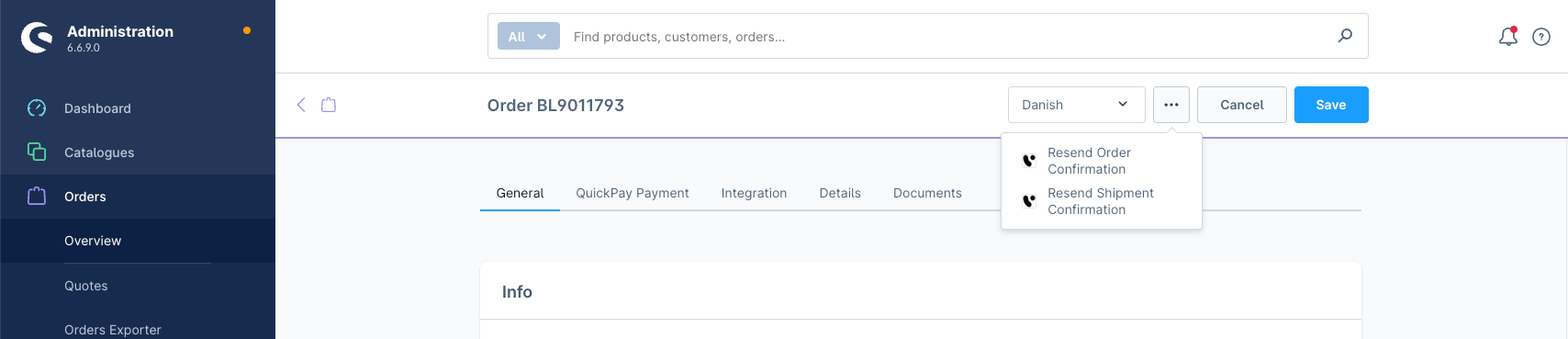
In the top-right corner of the order detail page, click the ⋯ (more actions) button.
3
Select the action
Choose one of the two options:
- Resend Order Confirmation — re-sends the order confirmation and sets the order status in Engage to confirmed. If the order is already marked as completed in Shopware, the receipt is also re-sent to Engage.
- Resend Shipment Confirmation — re-sends the shipment confirmation, sets the order status in Engage to shipped, and always re-sends the receipt to Engage.
What happens when you trigger an action
Voyado resolves the order and contact before sending the notification:- Contact — Engage checks whether the order’s customer email already exists as a contact. If it does, the contact record is updated with the latest data from the order. If it doesn’t, a new contact is created (requires customer sync to be enabled).
- Order — Engage checks whether the order already exists.
- If it doesn’t exist, a new order record is created with full order details before the notification is sent.
- If it exists and is linked to a contact, the order status is updated if needed, then the notification is sent.
- If it exists but has no linked contact, the order record is replaced and the notification is sent.
Troubleshooting
If you see an error referencing
support@voyado.com, customer synchronization is not configured for this shop. Contact Voyado support to resolve this.