

Connecting your markets to Engage
When setting up the Engage plugin in your store configuration, you can choose to map the Markets in Centra to Stores in Engage. This will help you see from which market you customers were recruited and also the market where the sales were made. By adding “market” to the External store ID field in the configuration, the extension will personalize and use the market name defined per each market as the store.externalId in Engage.
External store ID field
Sync of contacts
In Centra you have some configuration options for how to sync your customers to Engage: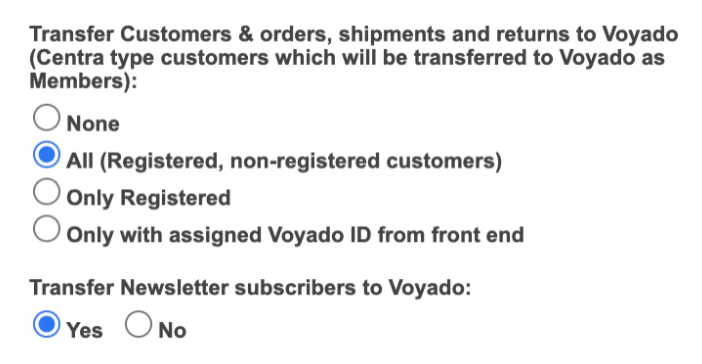
How to sync contacts
All (Registered, non-registered customers)
All (Registered, non-registered customers)
Choosing this will sync all the customers stored in Centra to the contact type “Member” in Engage.
Only Registered
Only Registered
This option will only sync customers that were created in Centra with the registered flag set to true. Customers will be registered as “Member” in Engage.
Only with assigned Voyado ID from front end
Only with assigned Voyado ID from front end
This option will only sync the customers created in Centra with a contactId from Engage.
Sync of purchases and returns
Sales are only registered to those customers created as contact type “Member” in Engage. Purchases: A receipt of type “Purchase” is sent to Engage once the order is completed in Centra and ready to be shipped. Returns: A receipt of type “Return” is sent to Engage when a refund has been registered in Centra. This is only applicable if the refund is registered in Centra. If not, then you’ll have to build an integration to the system that holds this information (e.g. ERP)Transactional emails
Out of the box, Centra can trigger four different transactional emails through Engage. All the order and payment states below are configured in Engage and can be filtered in Engage’s marketing automation platform. If a customer already exists in Engage, the transactional email will be triggered to the already existing contact. If not, then Centra will create a Transactional contact and trigger the email send-out. These are the transactional emails that are triggered:- Order confirmation
- Order has been shipped
- Order has been returned
- Order has been canceled
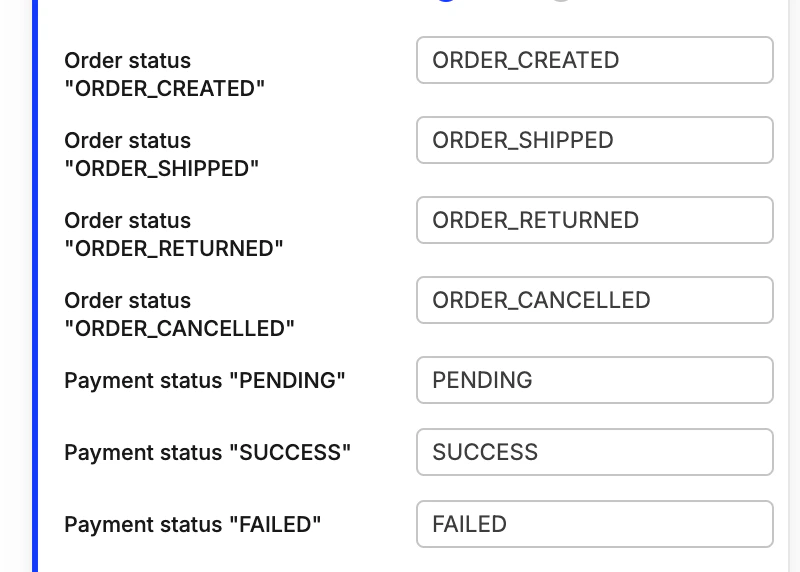
Setting up Order Statuses
Multichannel promotions
After some front-end development, you’ll be able to assign personal promotions through Engage and connect them to a voucher in Centra. These steps need to be implemented in order to make this work:- The front-end asks Engage if the customer has any active promotions. If so, the front-end takes the external promotion code it got from Engage and checks with Centra what the price rule is for that promotion.
- If the customer wants to use one of those promotions then the front-end applies the discount to the purchase (it already knows which price-rule to use).
- Once the purchase is completed then the front-end needs to send the promotionId in the purchase payload to Centra.
- After interpreting the promotionId Centra redeems the promotion in Engage through a separate API-call once the order is shipped.