

Prerequisites
Before starting the back in stock configuration for Centra, ensure the following:- Engage configuration: The integration must first be configured on the Voyado side before testing can begin. Contact your Voyado account manager or project team to ensure your Engage environment is correctly set up.
- Product Feeds: Product feeds must be connected to Engage for each locale (Ex: sv-SE).
- Event System in Centra: The event system must be enabled in Centra. Contact your Centra Customer Success Manager for validation.
- Back in Stock email module: A “Back in Stock” module must be added to your Engage email templates.
- API Credentials: API credentials must be set up in Centra and Engage.
- Subscription form in front-end: A back-in-stock subscription form must be available on the product page and connected to Engage’s Subscription API.
- Marketing automation: A back-in-stock marketing automation flow must be set up in Engage.
Configuring API token in Centra
Follow these steps:1
Log in to Centra
2
Navigate to System > API Tokens
3
Create a new Integration
The Integration should have a relevant name, for example “Engage integration”.
4
Enable all Store types
5
Enable all Stores you wish to integrate with Engage
6
Enable the following permissions
Write permissions:
- Event
- Allocation rule
- Event
- Market
- Product
- Product Size
- Product Variant
- Stock Change
- Store
- Warehouse
- Orders
- Returns
7
Save the API token securely
8
Share the API token securely with your Voyado team
Using multiple brands
This is important for the following reason: When the same token and integration name are reused across multiple brands, Centra will mark processed events (such as stock changes) as “Processed” for all integrations sharing that configuration. As a result, when Brand X processes its stock events, Brand Y will no longer receive the same event data in its subsequent stock-level queries. This leads to missing updates and prevents the back-in-stock automation from triggering correctly for Brand Y. Best practice tp prevent this is therefore:- Create one token per brand
- Assign each token a distinct Integration name (such as “Voyado_Integration_BrandX”, “Voyado_Integration_BrandY”)
- Ensure each token is only shared with its corresponding Engage tenant
Subscription API for Centra
The subscription flow is not supported “out of the box” and requires front-end development. These are the steps in building a subscription flow:1
Build subscription form
Build a subscription form that is visible when the end user enters a product variant page that is considered to be out-of-stock.
2
Register the subscriptions
Register the subscriptions in Voyado Engage, using the Subscription API for Centra.
3
Check locales
Ensure that the locale field aligns with the locales associated with the product feeds in Engage (for example: “en-US”).
The subscription endpoint
JSON example - Body
JSON example - Body
string
required
The email address of the user. Must be a valid email format.
Example: “john-doe@voyado.com”
string
required
The productSize.SKU value in Centra.
Example: “1234SIZEM”
boolean
required
If user accepts general newsletters or not.
Example: true
string
required
Unique identifier for your Centra environment.
Example: “voyadotenant-1”
string
required
Locale matching Engage product feeds.
Example: “sv-SE”
string
required
The Market ID connected to the user. Must match the Market ID in the stock change.
Example: “4”
JSON Example - Output to Engage
JSON Example - Output to Engage
JSON Example - Subscription
JSON Example - Subscription
Store field format
Thestore field used above must be a unique string based on your client’s setup.
When you have a single Engage environment for all stores just use the tenantId value as the store field. For example: “mytenant”.
When you have multiple Engage stores (one per Centra store) combine the tenantId and CentraStoreID to a single string. For example “mytenant-124”.
Doing this ensures each connection is uniquely identified in Engage.
Stock changes
Engage receives the current Free to Allocate (FTA) quantity for a product at the time of the stock change event. It does not calculate or use the delta (the change in quantity). This means the quantity value in the payload always reflects the latest available stock level, and not how much it has changed since the last update.Workflow
Here is the entire workflow as an image: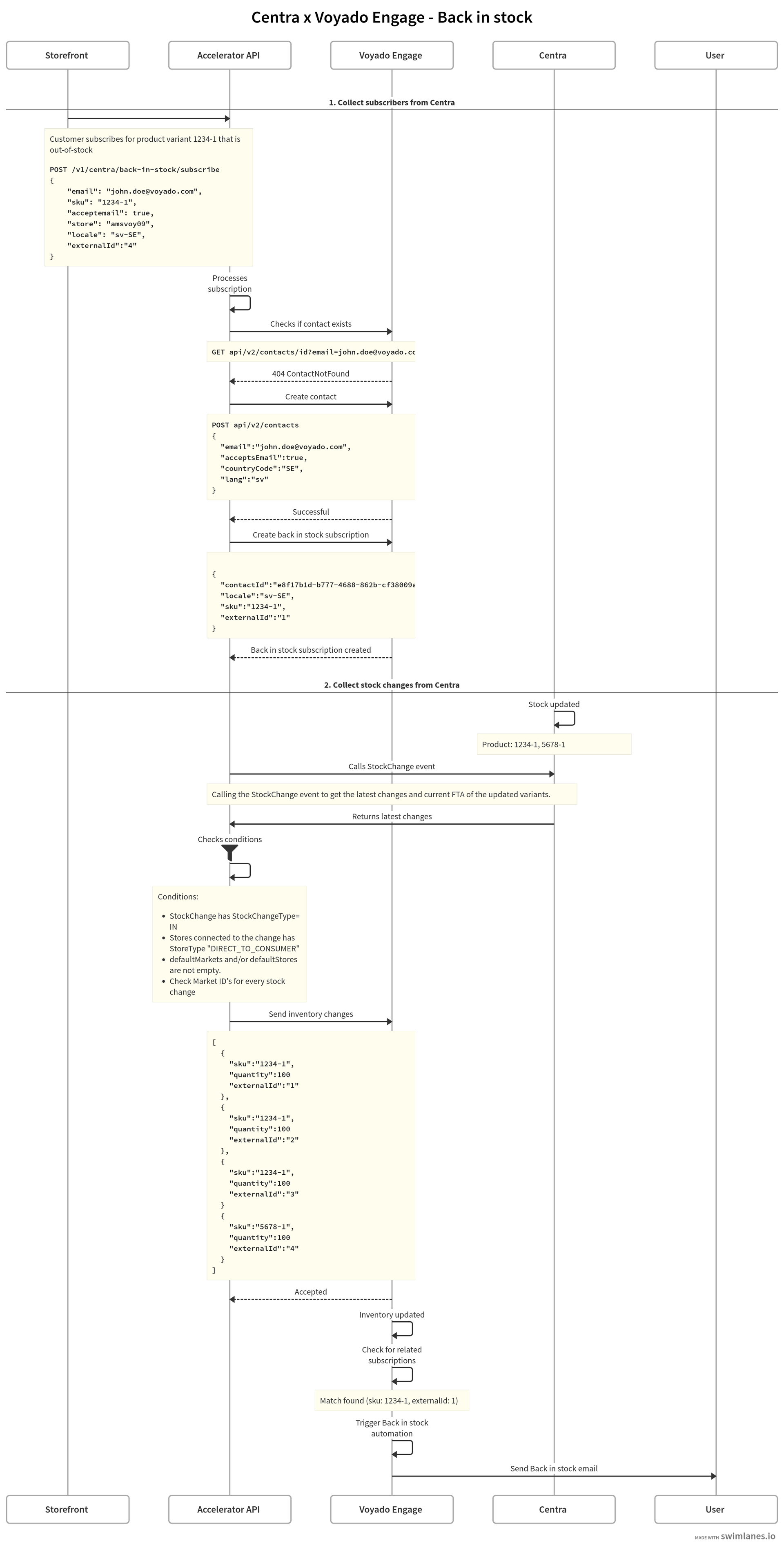
The back-in-stock workflow
Testing the Integration
Here are some ways to test the integration.Simulate subscriptions
Simulate subscriptions
- Subscribe to a back-in-stock notification for a test product.
- Validate that the subscription has been registered on the user in Engage.
Simulate stock changes and test notification emails
Simulate stock changes and test notification emails
- Update stock levels in Centra for a test product SKU.
- Validate that the automation has been triggered and a notification email is sent upon stock update.
Review integration logs
Review integration logs
- Check Engage Administration > Integration log to confirm stock changes and email triggers are processed correctly.