

Here are some of the most common questions about Meta leads.Documentation Index
Fetch the complete documentation index at: https://partner-integrations.voyado.com/llms.txt
Use this file to discover all available pages before exploring further.
What is the Meta Lead Ads integration with Engage?
What is the Meta Lead Ads integration with Engage?
What data is transferred from Meta to Engage?
What data is transferred from Meta to Engage?
- First name and last name
- Email address
- Phone number
- Address data
- Personal data
- Custom fields
- Consent information
- Form
How quickly are leads synced to Engage?
How quickly are leads synced to Engage?
What happens to leads once they're in Engage?
What happens to leads once they're in Engage?
- Trigger welcome journeys (email or SMS)
- Segment based on source (e.g., campaign name, form)
- Add to ongoing nurture flows
- Track engagement and conversion over time
Can I customize what happens after a lead is synced?
Can I customize what happens after a lead is synced?
- Use automations to define follow-up steps (e.g., send a welcome email, wait 3 days, send reminder)
- Apply tags or custom attributes based on form or campaign
- Use segments to filter leads for specific campaigns
Is consent handled in the integration?
Is consent handled in the integration?
Are custom attributes handled in the integration?
Are custom attributes handled in the integration?
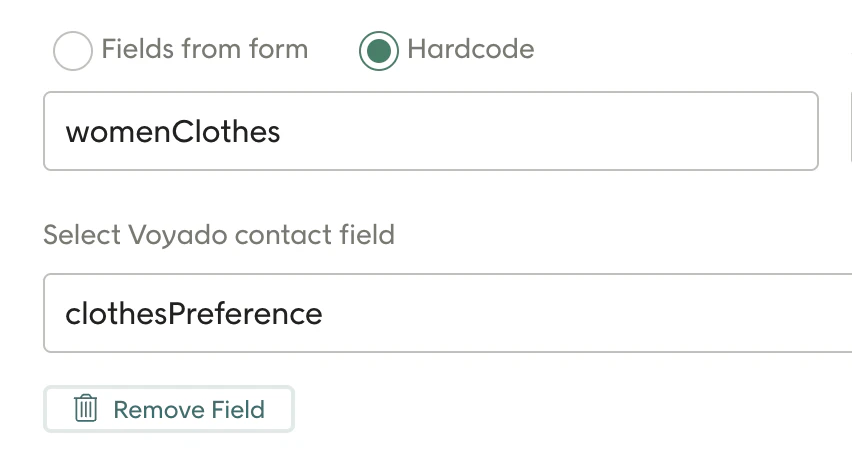
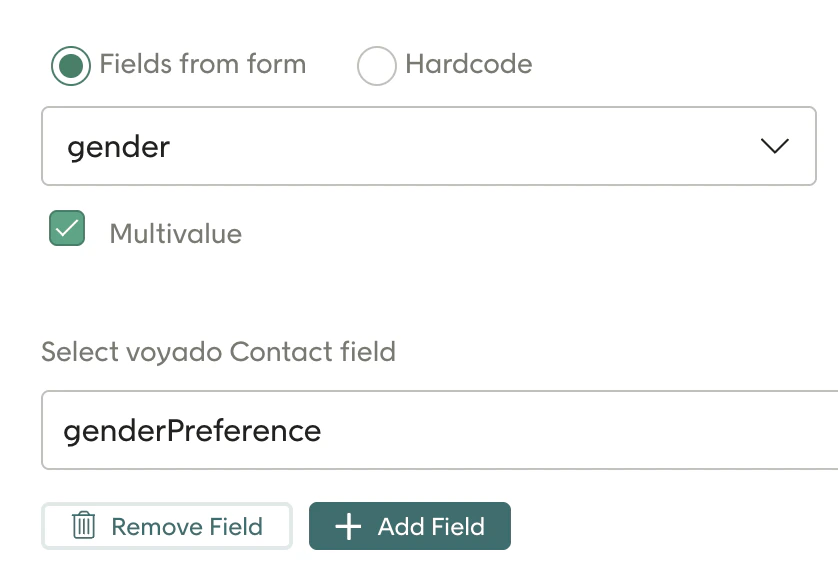
Is multiple-select handled in the integration?
Is multiple-select handled in the integration?
What contact types does the integration support?
What contact types does the integration support?
Do I need to set up the attribute customSource myself?
Do I need to set up the attribute customSource myself?
Can I track what form the customer comes from?
Can I track what form the customer comes from?
How do I set up the integration?
How do I set up the integration?
- Connecting your Meta Business account to the integration.
- Selecting which Lead Ad forms to sync.
- Mapping Meta form fields to Engage contact fields.
- Testing the sync to ensure data flows correctly.
Do I need technical skills to use the integration?
Do I need technical skills to use the integration?
Can I track performance of these leads in Engage?
Can I track performance of these leads in Engage?
- Email/SMS engagement (opens, clicks)
- Conversions and purchases
- Which campaigns or forms generate the most valuable leads
What's the benefit of using this integration?
What's the benefit of using this integration?
- Real-time activation of leads
- Improved conversion through immediate follow-up
- Centralized customer data in Engage
- Less manual work — no more exporting/importing leads
- Better segmentation and targeting from ad to inbox
What is the cost for using the integration?
What is the cost for using the integration?
- You will need the Online ads license where Meta Leads is included
- An onboarding cost may be applied