

string
required
The shop’s unique identifier on Shopify. Example: “store-uk.myshopify.com”.
string
required
The locale setting of the merchant. Example: “en”.
string
required
The country code of the user’s location. Example: “GB”.
boolean
required
If marketing opt-in is preselected. Example: false
string
required
The email address of the user. Example: john@example.com.
boolean
required
Indicates whether the user accepts email communication. Example: true.
boolean
Indicates whether the user accepts SMS communication. Example: false.
boolean
Indicates whether the user has provided a phone number. Example: false.
string
required
The variant’s unique identifier. Example: “47695659598128”.
string
required
The stock-keeping-unit associated with the variant. Example: “jersey-XS-red”.
boolean
Indicates whether the variant is available for purchase. Example: false.
string
The product’s unique identifier. Example: “8386707489072”.
More about preSelectStatus
The preSelectStatus field indicates whether the marketing opt-in checkbox is pre-selected on the back-in-stock subscription form. This boolean value is set by the merchant and determines the initial state of the marketing opt-in option for users interacting with the widget. true: The marketing opt-in checkbox is now pre-selected, meaning customers will be opted into marketing communications by default unless they choose to opt out. false: In this case the marketing opt-in checkbox is not pre-selected, meaning customers will need to actively opt into marketing communications. The preSelectStatus is used to determine if an update to a customer’s preferences is necessary. It ensures that any updates do not override consent previously given by the customer.This is the same concern as pre-selected opt-in in the Shopify checkout, which is configured separately and which Voyado recommends against. If you are setting
preSelectStatus to true here, read Sync of email marketing preferences first.Data flow
Here is the data flow when working with back-in-stock subscriptions: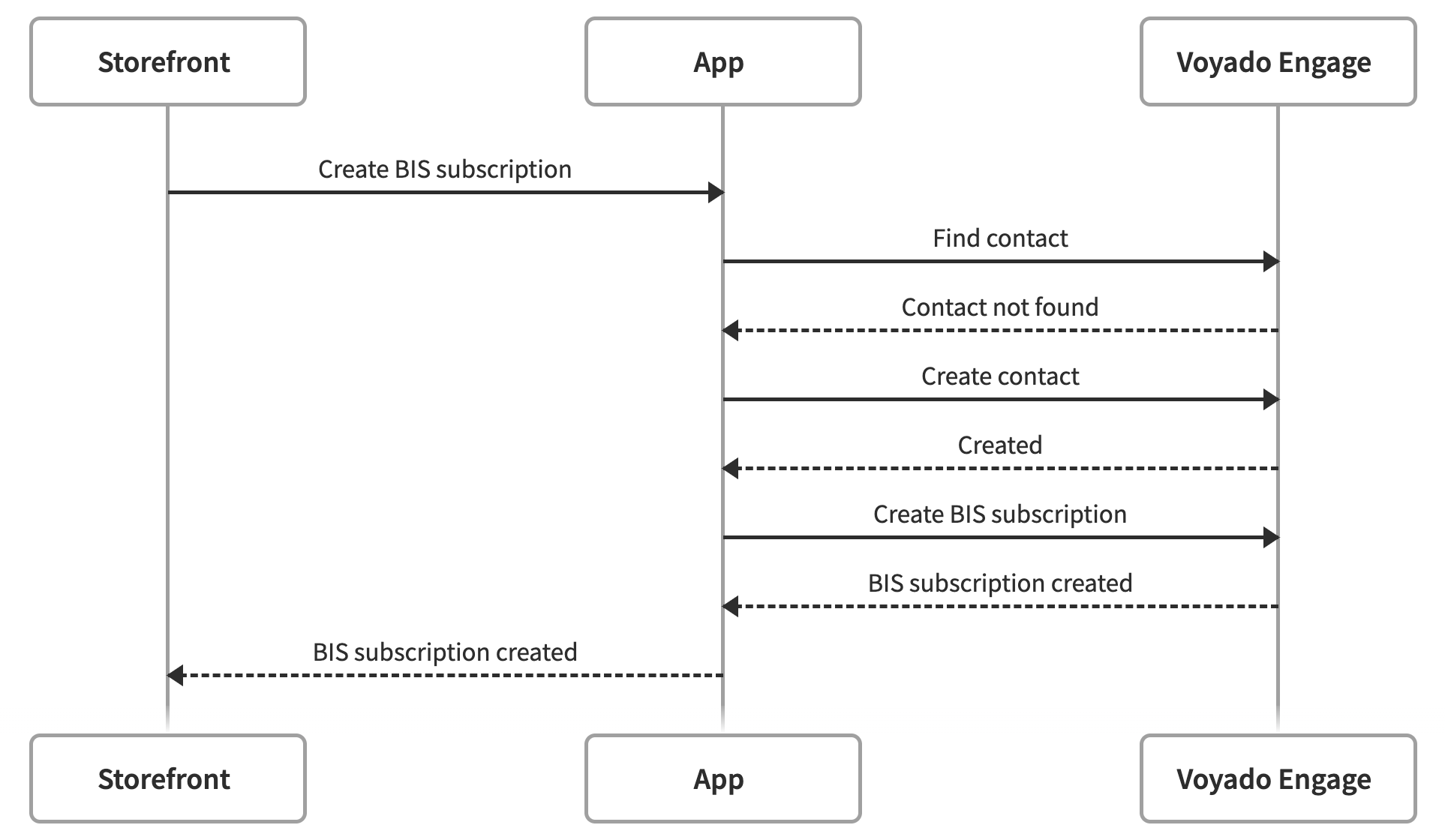
Back-in-stock subscription flow